Build from one record
Use the answers and evidence already captured during the inspection.
- Structured findings
- Photos and notes
- Signatures
MeetInspect keeps fieldwork moving even when the signal stops

Professional outputs
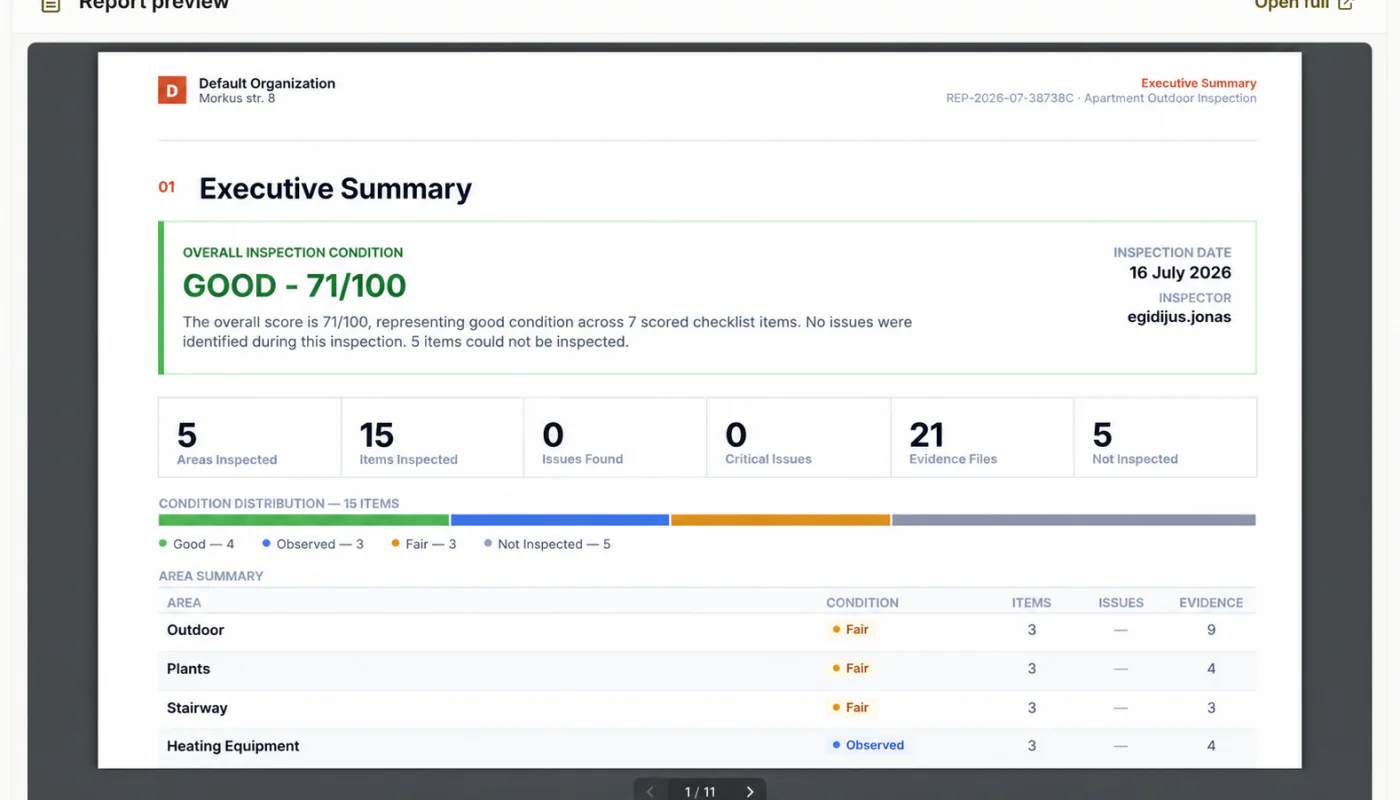
Generate a professional PDF from the reviewed inspection record, including the property or asset details, structured findings, photographs, notes and signatures captured during fieldwork.
Who it is for
For inspection teams that want reports to follow from structured evidence instead of being rebuilt manually after every visit.
About MeetInspect
MeetInspect is inspection management software for professional field teams, with a native iOS inspection app and web administration platform.
MeetInspect helps teams create reusable inspection templates, schedule inspections, work offline, capture photos, videos, notes and signatures, document defects and generate professional inspection reports.
Capabilities
Use the answers and evidence already captured during the inspection.
Resolve missing information and check the completed inspection before report generation.
Generate a consistent PDF using the workspace report configuration.
Retain the report with the inspection record that produced it.
How it works
Capture the required answers, evidence and sign-off.
Check completeness and resolve findings that need attention.
Create and share the approved inspection report.
FAQ
Related workflows
Field-first inspection software for consistent evidence, offline capture and professional reports.

© 2026 MeetInspect. All rights reserved.